Get Microsoft Ads setup, tools and coupon for
  free!
free! 


If you own or manage an e-shop, you’re probably investing in Google Ads to acquire new customers. But did you know that many of your clicks may be wasted if your ads are targeting the wrong queries?
That’s why you should turn to the Search Terms Report, a tool that shows you what your customers are actually searching for and how your ads respond to those queries.
What the Search Terms Report is and why it matters
The Search Terms Report isn’t just a table of phrases. It’s a window into your customers’ minds…
It shows the exact words and phrases people typed into Google that triggered your ads. Unlike keywords, which you set yourself, search terms are authentic queries from real users.
Thanks to this, you can:
- uncover whether your ads are reaching the right audience
- find out which terms are irrelevant for your business
- discover new opportunities for products or campaigns you might otherwise overlook
This report is useful for all types of campaigns: traditional Search campaigns, Shopping campaigns, and even automated campaigns such as Performance Max or Dynamic Search Ads (DSA).
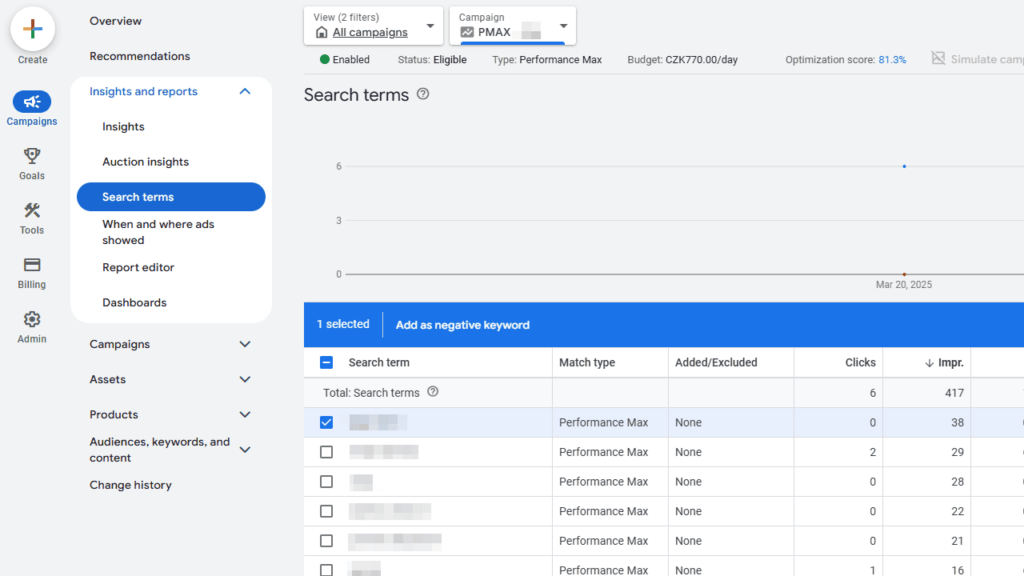
Source: PPC News Feed
How to read and interpret the report
When working with the Search Terms Report, pay attention to three key elements:
- Search Term – presná fráza, ktorú používateľ zadal
- Keyword – keyword, ktorý spustil daný dopyt (v automatizovaných kampaniach môže byť prázdny alebo označený ako “Exact”)
- Match Type – shows how precisely Google evaluated the match between the query and your keyword
Interestingly, the match type of a query can differ from the match type of your keyword. For example, a broad keyword can trigger a search term that Google interprets as an “exact match close variant.” This gives you valuable insights into how the Google Ads algorithm understands your content and your customers’ search habits.
Practical uses of the report
The Search Terms Report offers far more than just adding negative keywords. Here are several practical ways to use it:
- Uncovering irrelevant queries – if your ads appear for unrelated phrases, add them as negative keywords.
- Identifying high-performing search terms – if certain queries lead to conversions, consider adding them as standalone keywords or adjusting your bidding.
- Improving ad copy and landing pages – analyze recurring phrases and tailor your content to them.
- Optimizing automated campaigns – for DSA or Performance Max, you can see which landing pages or ads triggered specific queries.
Also pay attention to the “Other search terms” section, which includes low-volume or privacy-protected queries. This data can help you decide whether to broaden or narrow your targeting and bidding.
Tips for effective optimization
When working with the Search Terms Report regularly, it’s important to focus on several aspects. First, track which specific queries generate conversions and adjust your campaigns accordingly. On the other hand, avoid overly broad keywords that often trigger irrelevant clicks and waste your budget.
It’s also useful to regularly review your product feed to ensure it reflects current customer search behavior. Use match types to fine-tune bids and target your ads more precisely, and look for new opportunities – such as products or seasonal campaigns – that may interest potential customers.
Why it pays to monitor the report regularly
Regular analysis of the Search Terms Report brings many benefits. It helps you save budget by reducing wasted clicks and allows you to better target ads to genuinely relevant customers. It helps uncover new products or phrases you might otherwise ignore and improves the performance of automated campaigns.
Even small adjustments based on the report’s data can lead to significant increases in conversions and a higher return on ad spend.
Conclusion
The Search Terms Report is an indispensable tool for every e-commerce marketer. It gives you insight into how customers actually search for your products and enables you to optimize campaigns with precision. By using this data effectively, you can minimize budget waste, increase ad relevance, and discover new business opportunities.