Get Microsoft Ads setup, tools and coupon for
  free!
free! 


Is your P.Max campaign running, clicks are piling up, but your high-performers are getting the same budget share as products that don’t convert? Are your asset groups a mess, filters often incorrect, and manual checks tedious and chaotic?
Then you’re in the right place.
We know this problem inside out.
That is exactly why we developed the unique “Campaign Budget & Structure” update within our P.Max ROAS Labelizer.
The new update allows you to:
- Fix and display label filters in bulk
- Create (or Assign) P.Max campaign copies with the correct label filters.
- Set recommended budgets automatically
- Import P.Max campaigns that do not yet exist in BlueWinston
How to do it?
Open Labelizer → Recommendations → Campaign Budget & Structure
Once the section is opened, the current phase (A) where the Labelizer is presently active will automatically be displayed. Phases switch automatically based on the number of conversions over the last 90 days, so you can always see exactly which optimization stage your campaigns are in.
The current phase opens by default, but the system also allows you to browse other phases to give you a full overview of the process. However, changes to campaigns can only be applied within the current phase. This ensures that the Labelizer only makes adjustments where they are relevant and safe.
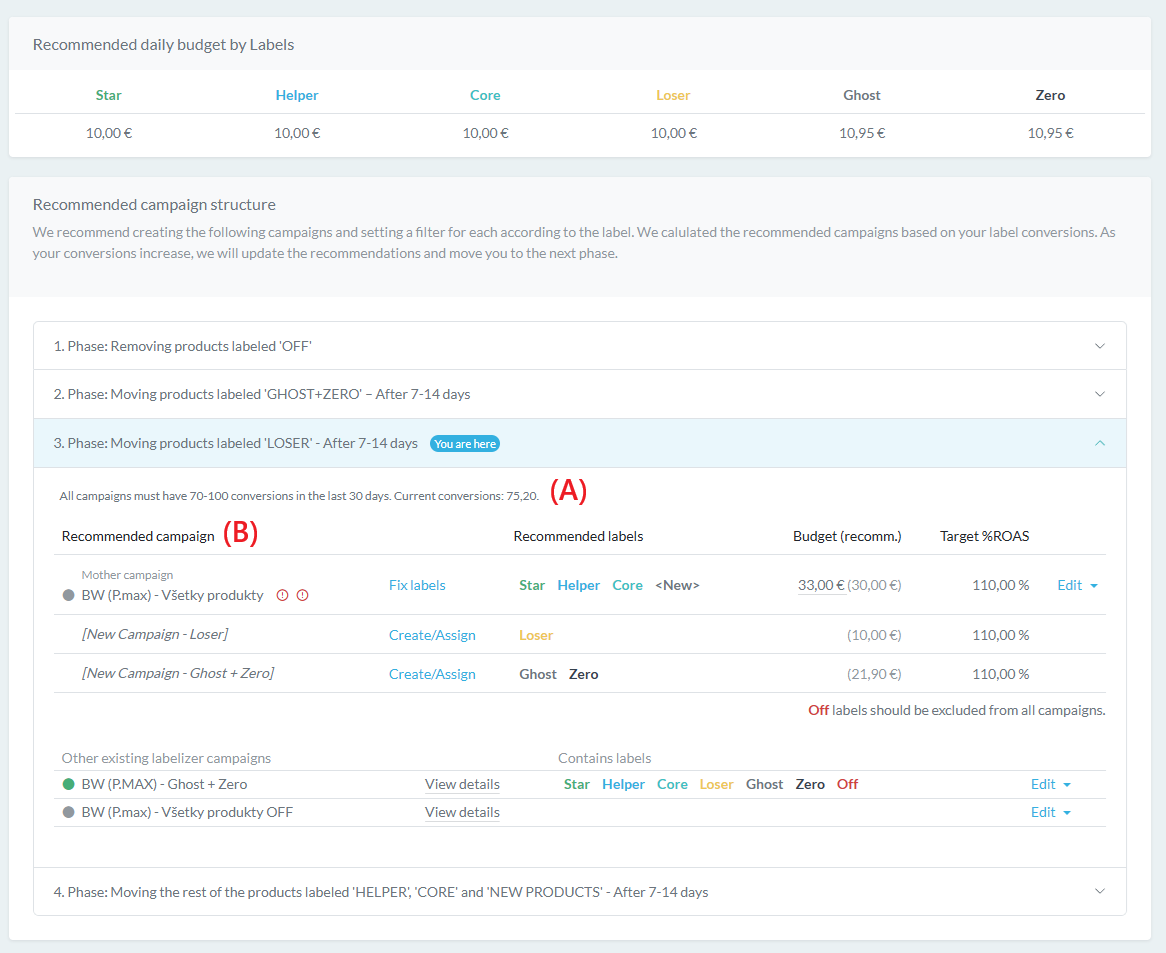
Below, you will see a list of recommended campaigns (B), which represent the optimization goal.
Underneath these are the remaining campaigns currently in the Labelizer that, for various reasons, do not yet have their products correctly assigned according to the recommended labels.
Mother Campaign: The Foundation of Your Structure
The entire process starts with the Mother Campaign – the very first campaign assigned to the Labelizer, serving as the foundation for creating the entire recommended structure.
Products are gradually removed from this campaign and moved into new campaigns based on their recommended labels (such as Winner, Loser, Ghost, or Zero). This ensures that every product group aligns perfectly with its specific performance category.
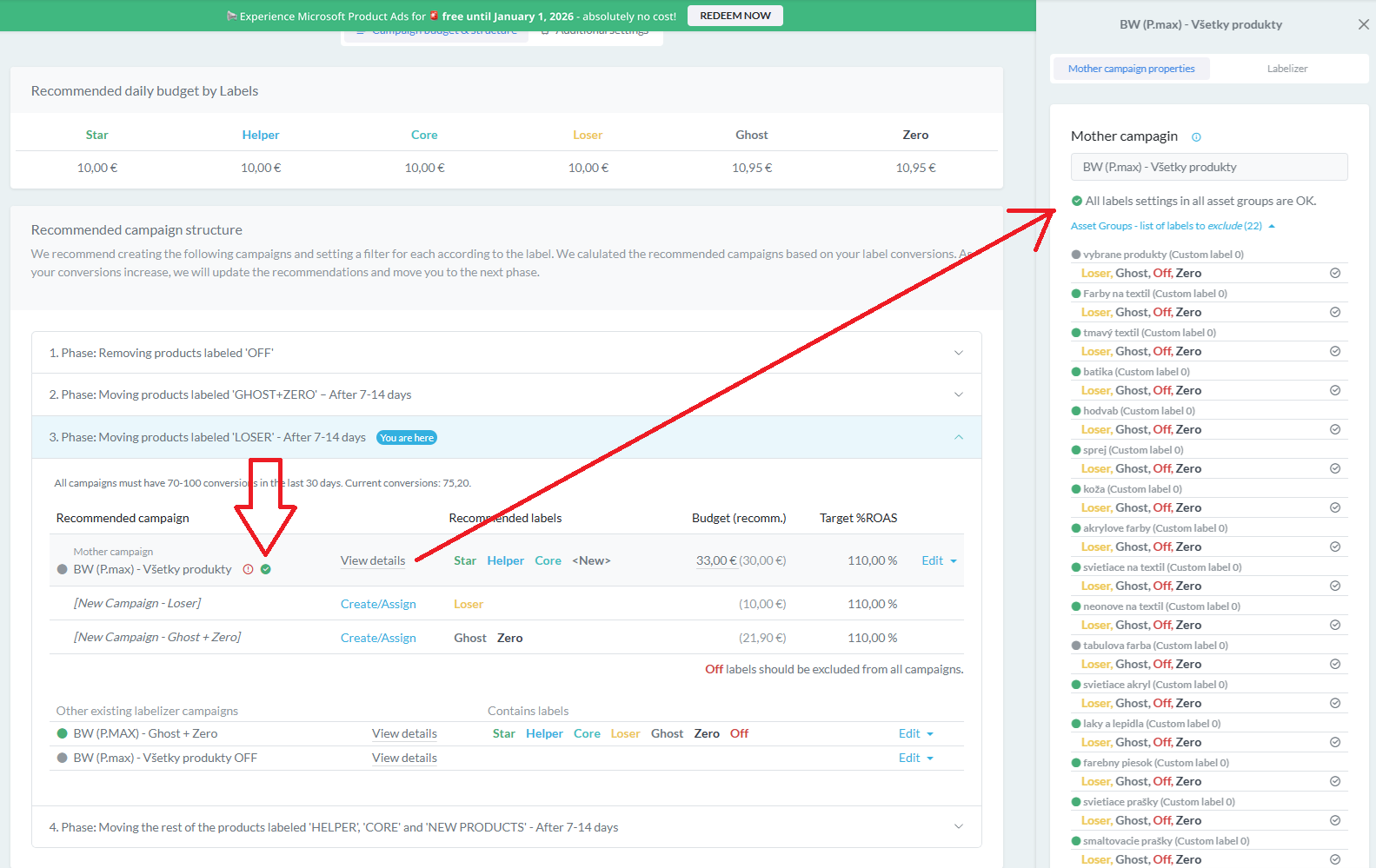
UPDATE 1) Fix Labels: Bulk Check and Correction
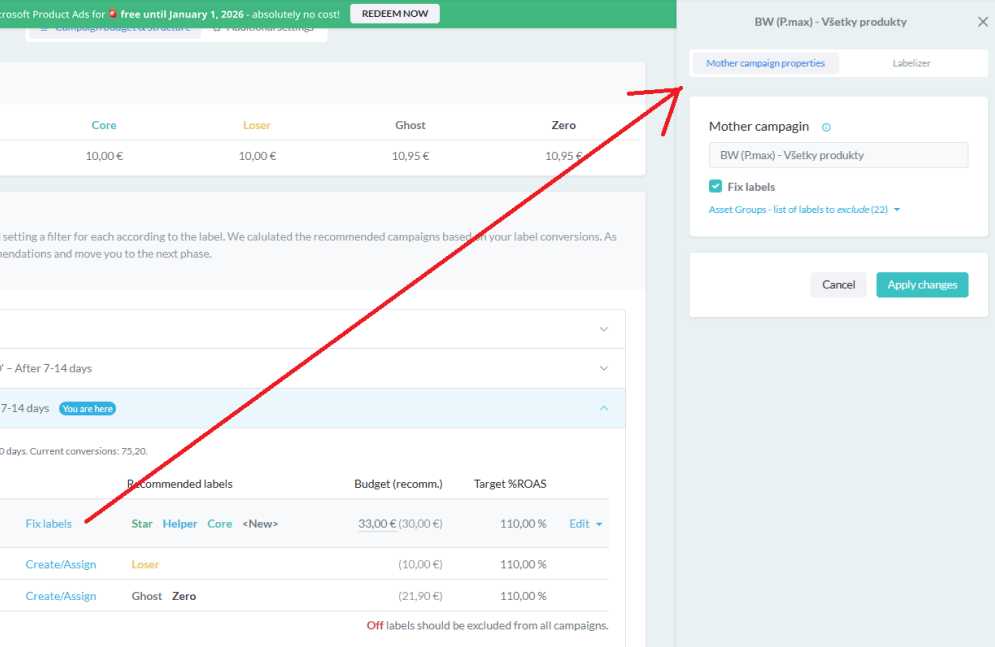
If the Mother campaign contains products with incorrect labels, the system identifies them immediately. You can fix them with a single click using the Fix labels button, ensuring every product is categorized exactly where it belongs.
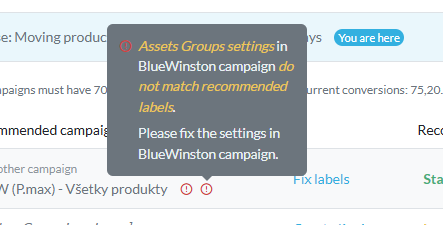
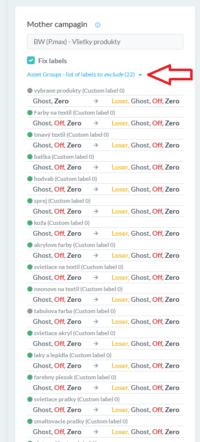
A P.Max campaign can contain multiple asset groups, each with up to 5 custom labels.
However, all it takes is an error in a single asset group for products to stop filtering correctly, which can negatively impact campaign performance.
The new update therefore introduces the ability to clearly display the settings of all asset groups, identify incorrect filters, and fix them in bulk.
After clicking Apply changes, all adjustments are executed immediately, and the system signals a successful update with an OK icon. Campaign settings can be verified at any time via View details, giving you a constant overview of the current filter status and configuration.
UPDATE 2a) Creating Campaign Copies with Correct Filters
In addition to fixing existing campaigns, the Labelizer allows you to create new campaigns as copies of the Mother campaign.
During this process, the system automatically configures:
- Correct filters based on recommended labels, ensuring every product is placed exactly where it belongs.
- The new campaign name, which defaults to the original Mother campaign name, appended with information about the labels it contains.
- The budget, which is set by default to match the recommended values for the specific labels.
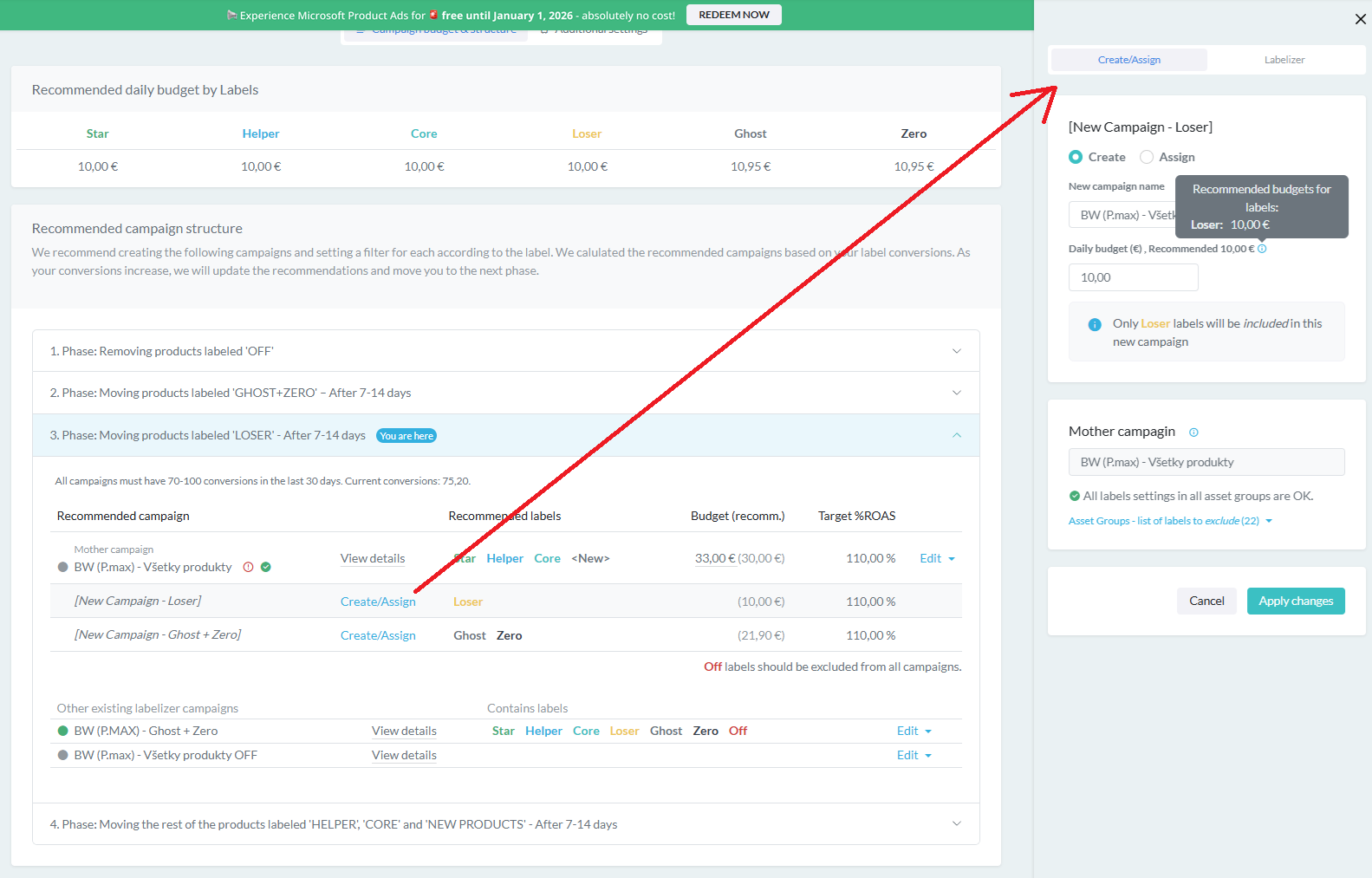
After clicking Apply changes, a new campaign with the correct filters is created, ready to run, and its settings can be checked at any time via View details.
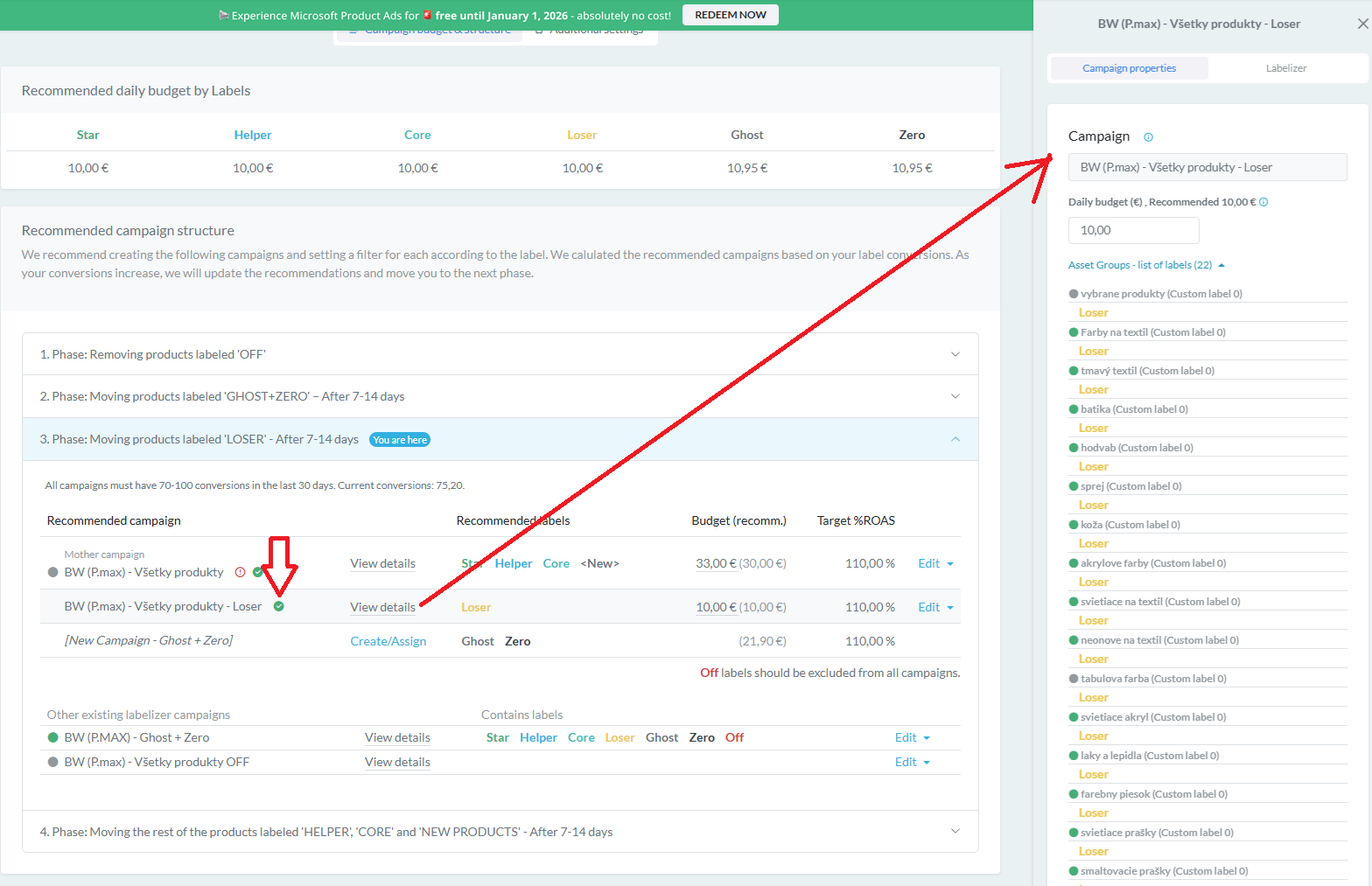
UPDATE 2b) Assigning an Existing Campaign: Fixing Without Deleting
In the event that BlueWinston recommends a campaign that you have already created, do not recreate it as a copy of the Mother campaign.
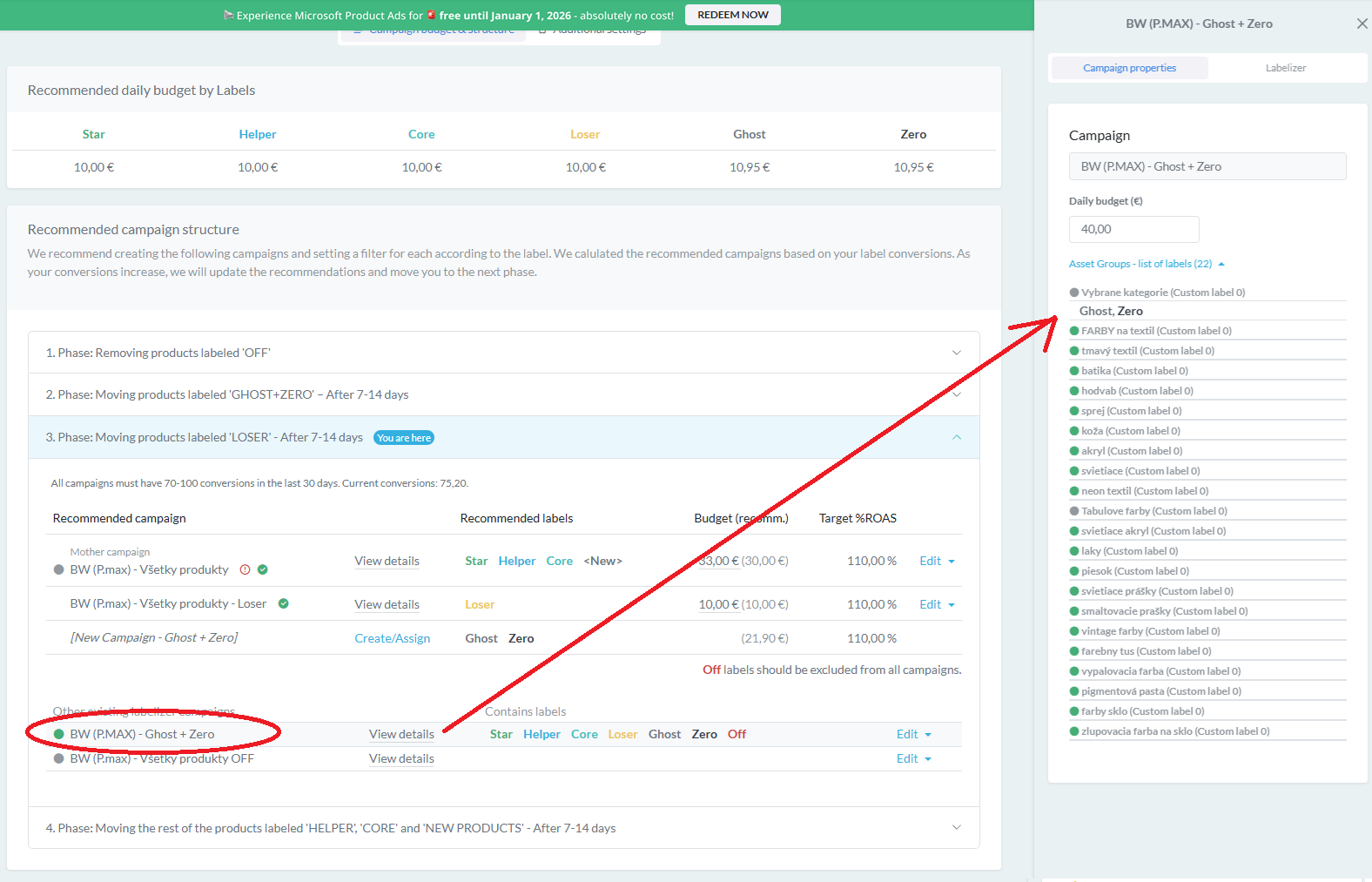
The Labelizer offers the option to link this campaign using Create/Assign (D1). Simply click on Assign (D2), select the corresponding campaign from the list (D3), and set the recommended budget. After clicking Apply changes, the filters will be automatically updated across all asset groups (D4).
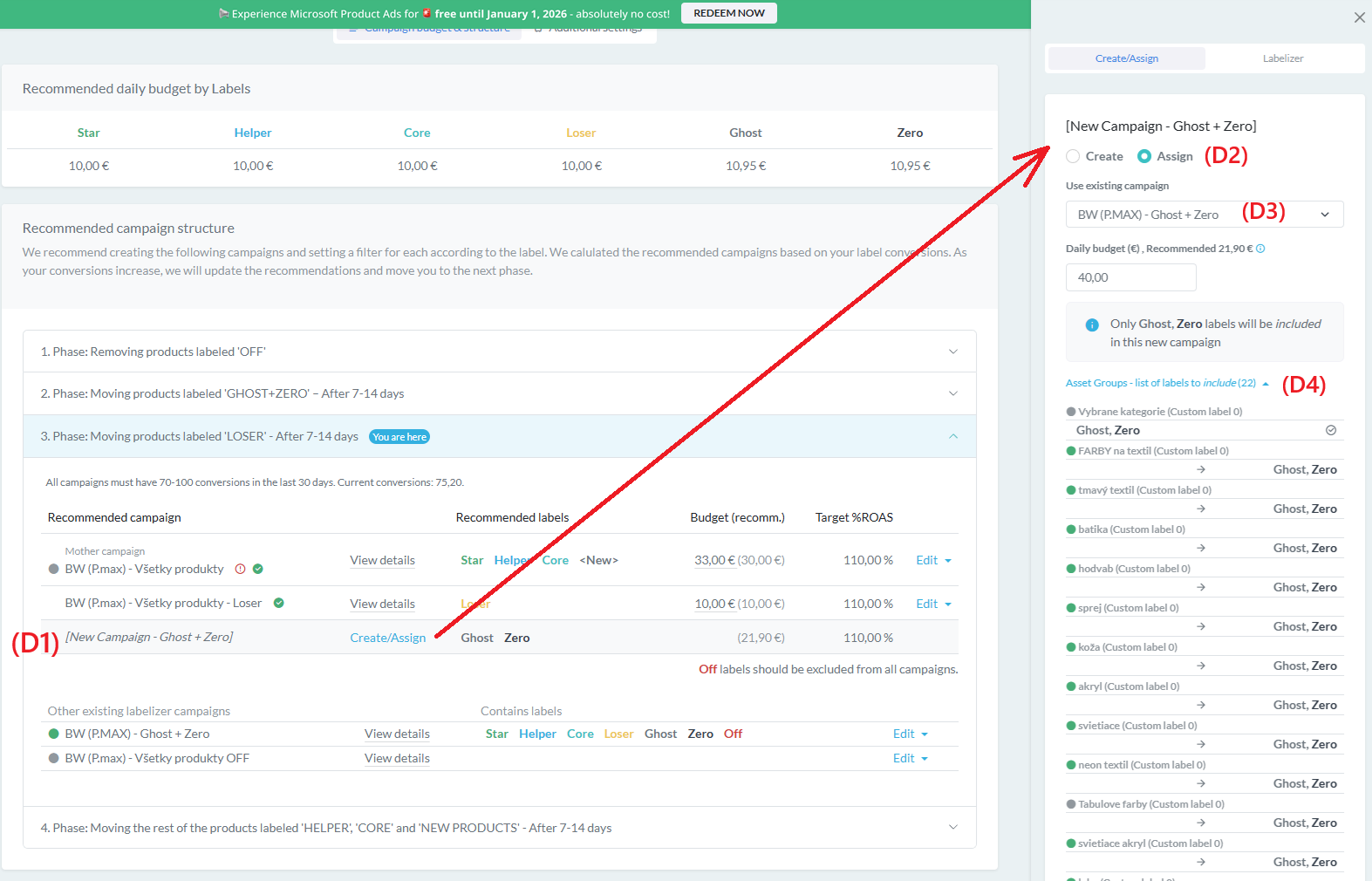
Settings can be reviewed at any time via View details, including the option to manually adjust the budget. In this way, an existing campaign is aligned with the recommended structure without the need to delete it or create a duplicate.
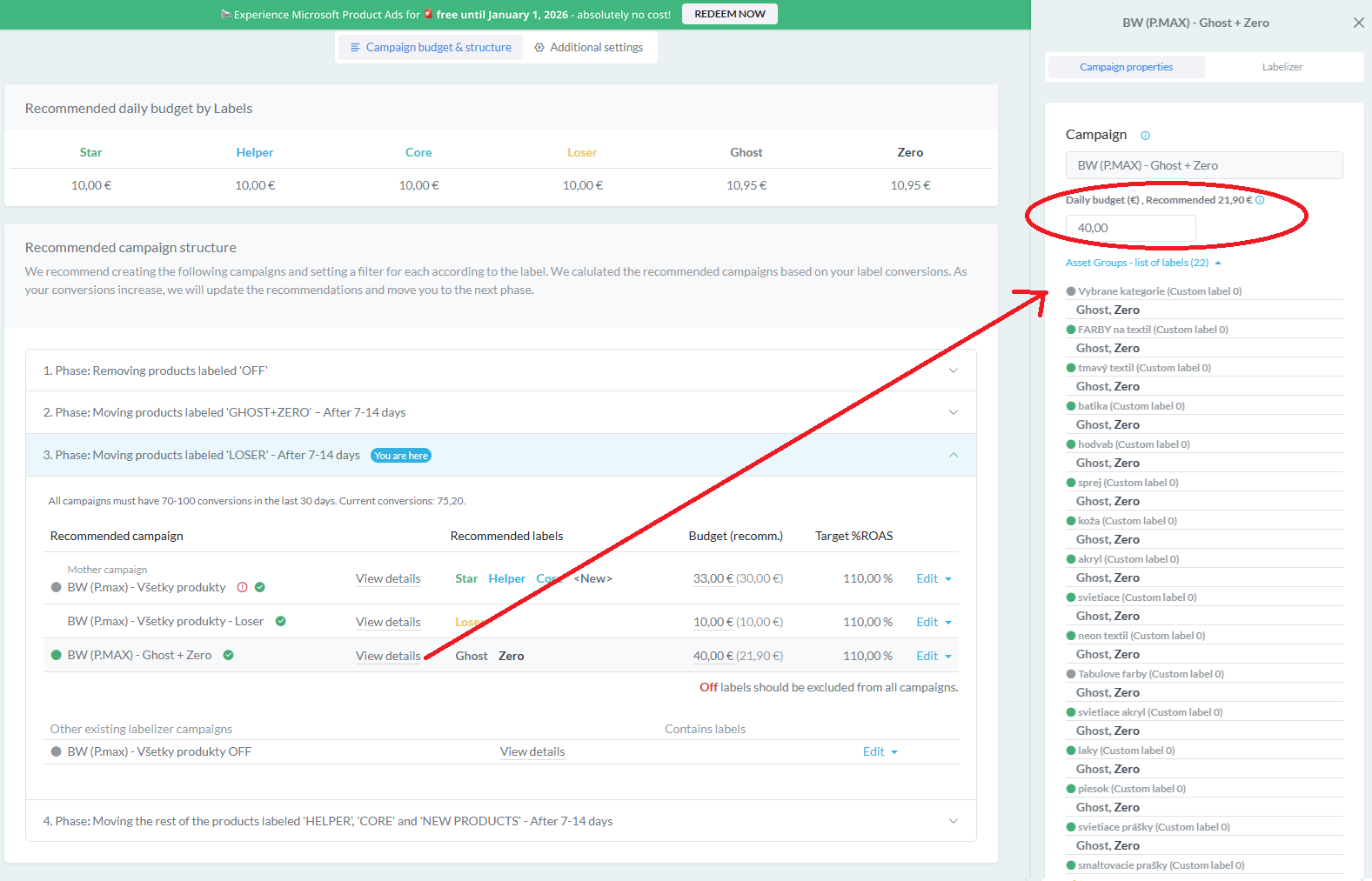
UPDATE 3) Performance-Based Budgeting
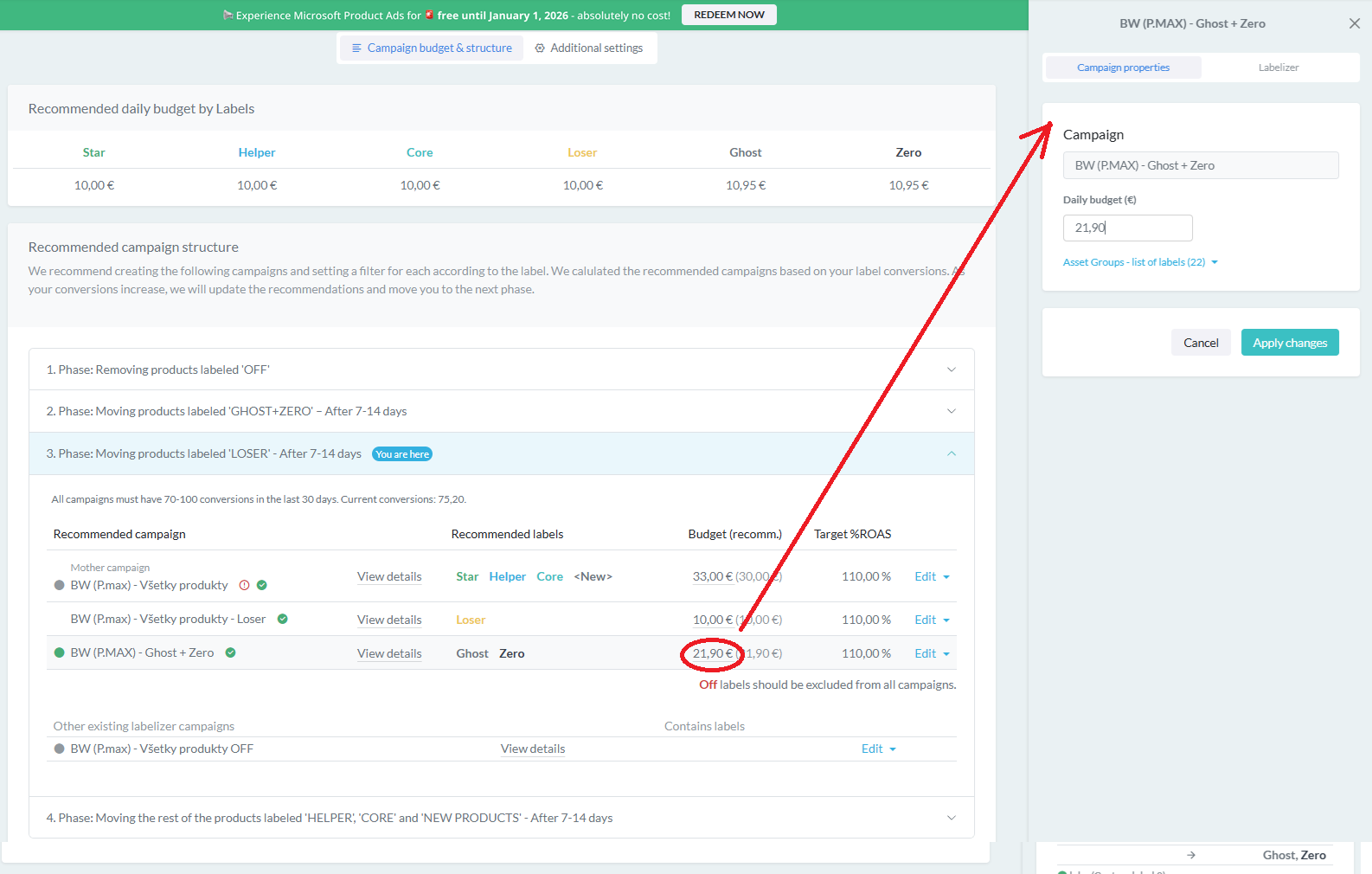
With every campaign in BlueWinston, you have the ability to adjust the budget instantly.
The system displays both the current budget and the recommended value, which is calculated as the sum of the recommended budgets for the individual labels within that campaign.
You can make the change directly by clicking on the value, allowing the budget to flexibly adapt to the current performance of your products.
UPDATE 4) Importing P.Max Campaigns from Outside BlueWinston
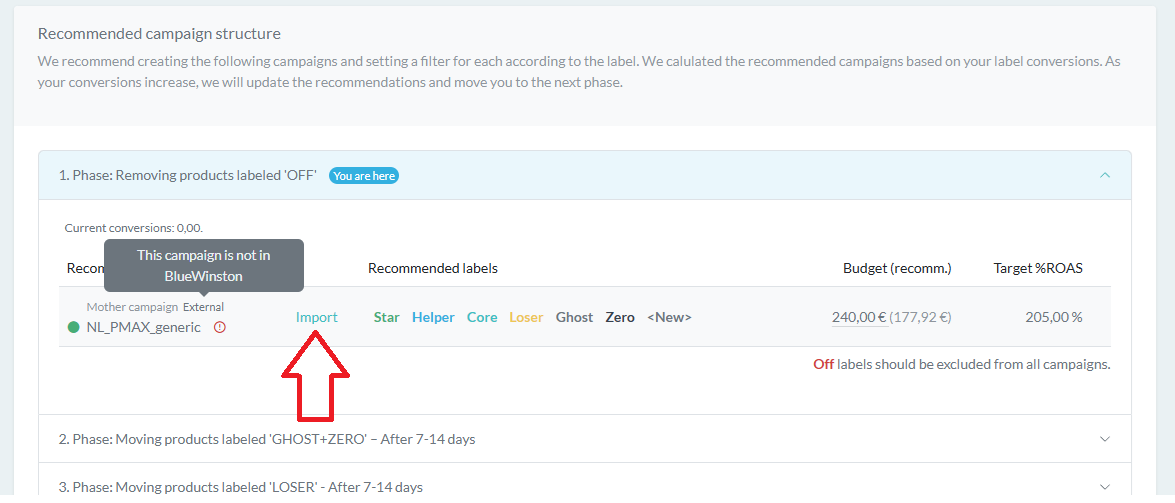
The platform also works with campaigns that have not yet been imported into BlueWinston.
It allows you to easily import them and simultaneously overwrite the asset group structure to ensure full compatibility with the Labelizer logic.
Once imported, products can be filtered by ID and integrated into the recommended campaign architecture.
Why Structure is Decisive
Many competing tools on the market optimize feeds or bidding, yet they fail to systematically address P.Max campaign architecture. And that is precisely where the biggest problem often lies.
P.Max campaigns run on data and signals. If their structure is inconsistent, the algorithm optimizes based on distorted inputs. The result is unreadable performance, unclear budget distribution, and “blind” decision-making.
However, when the architecture is clearly defined, performance becomes transparent and manageable.
The new update in BlueWinston doesn’t just add another layer of automation – it adds a system. Products are always where they belong, filters are fixed in bulk, and the budget is driven by the performance of individual segments.
Automation ≠ Autopilot.
Automation needs structure.
Try BlueWinston Risk-Free
If you aren’t using BlueWinston yet, now is the perfect time. You can use the entire platform, including the BlueWinston Labelizer, free for 30 days and test the recommended campaign architecture in practice.
Want to know more or unsure how to integrate this update into your strategy?
Book a video call with our team or write to us at [email protected]. We’ll be happy to show you how to get your P.Max campaigns under control-systematically, with data, and for performance.