Get Microsoft Ads setup, tools and coupon for
  free!
free! 


Most performance-driven campaigns in Google or Microsoft Ads today run with maximum automation. However, many marketers face a dilemma:
…why do some products “take off” while others “sleep,” even with the same budget and settings?
The answer lies in how these platforms see and process a product as a data object, not simply as a “type of goods” or a nice image.
A Product is more than just a name or an image
Advertising system algorithms do not see products the way humans do—they do not evaluate creativity or emotion. They see structured data coming from the product feed in Google or Microsoft Merchant Center. This feed determines whether a product can be shown at all, how it is compared to competitors, and how bidding responds.
Product identity
For a product to be fully performance-ready, it must have the correct identification attributes:
- GTIN – (Global Trade Item Number) – a globally unique product code
- MPN – (Manufacturer Part Number) – the manufacturer’s part number
- Brand– the product brand
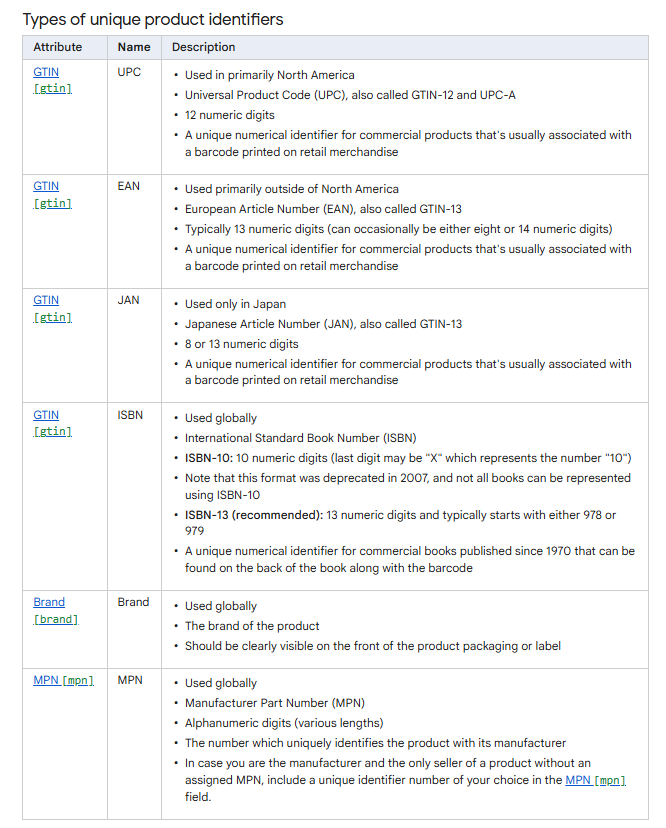
Source: Google Support
These identifiers help the algorithm match the product to relevant demand and compare it correctly within the market. Products with valid GTINs often achieve better visibility and higher relevance because the system can reliably place them into auctions.

Source: Google Support
If a product does not have the required identifiers available (GTIN, or alternatively MPN and brand in a sufficient combination), this must be explicitly communicated to Google using the attribute identifier_exists = no (or false)
This confirms that identifiers genuinely do not exist for the product. Inventing or using invalid identifiers (e.g., a fake GTIN) is inappropriate and may lead to product disapproval or reduced visibility.
Title and Description
For the algorithm, the product title acts as a kind of meta-navigation signal. It should be:
- accurate, consistent, and structured
- include the brand, product type, and key attributes
- reflect what customers are actually searching for
Inconsistent or “SEO-heavy” titles can reduce search relevance and worsen CTR. On the other hand, a clean and clear title gives the system a better match with user queries.
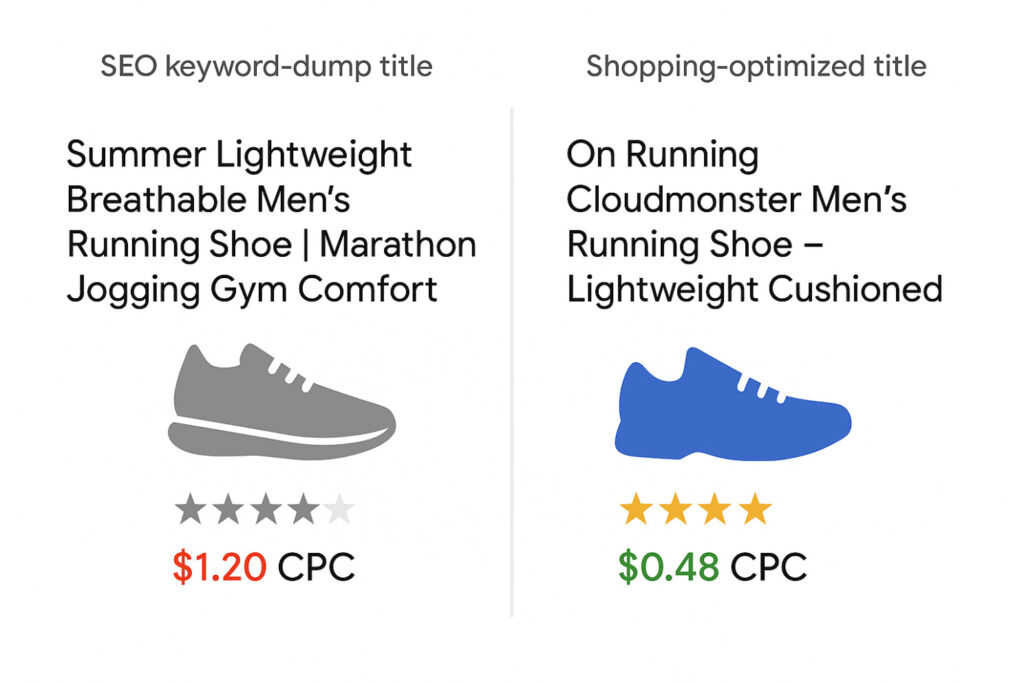
Source: LinkedIn GoDataFeed
Price and Availability
Algorithms do not just compare prices—they use them:
- to predict CTR and relevance
- to estimate return for a given query
- to decide whether a product has room to compete in the auction
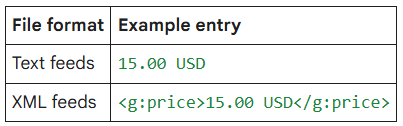
Source: Google Support
Availability (“in stock” vs. “out of stock”) also directly affects product visibility. Out-of-stock products are often suppressed or not shown at all. That’s why it is critical for the feed to contain up-to-date availability and pricing data.
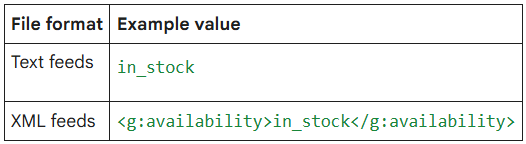
Source: Google Support
Variants
Variants such as colors, sizes, or bundles are not just aesthetic. The algorithm treats them as separate SKUs (Stock Keeping Units), each with its own performance. If variants of the same product have inconsistent or contradictory data in the feed, the system may:
- incorrectly estimate the performance of individual variants
- average data across variants instead of evaluating them separately
- reduce priority or visibility for certain variants
Properly separated and clearly defined variants help the algorithm learn faster and optimize more effectively.
Historical performance
Although a product feed may appear to be a static dataset, algorithms also incorporate performance signals such as:
CTR (click-through rate) – how often users click on the product
conversion rate – how often the product leads to a conversion
historical performance in automated strategies (e.g., Performance Max)
Products with strong historical performance are then prioritized in budget allocation and tend to receive more impressions under the same conditions than lower-performing products.
Consistency between feed and e-shop
Technical marketers often overlook this issue, yet discrepancies between feed data and on-site reality are among the main reasons systems lower a product’s performance score. Most commonly, differences occur in:
- product price
- availability or stock status
- product title
- invalid or broken URL addresses
Microsoft Ads – same data, different processor
Like Google, Microsoft Advertising also relies on the product feed as its primary data source. The difference is that it uses its own algorithm to evaluate products, even though it can directly import feeds from Google Merchant Center.
This approach simplifies data synchronization across platforms and ensures that key information — product titles, prices, availability, and inventory status — remains consistent in both systems.
Feed quality is just as critical here. Inconsistent or outdated data can prevent Microsoft Advertising from delivering products correctly, reduce visibility, or negatively impact campaign performance. The same rule applies as with Google Ads: the more accurate and consistent the data, the better the algorithm can optimize impressions, bidding, and product relevance.
Conclusion
Campaign performance is not just about budgets, settings, or bidding strategies. At its core, it depends on how well your products “speak the language” of the algorithms that decide initial visibility, relevance to specific queries, and the efficiency of automated strategies.
When working with products, it is therefore essential not only to have a properly structured feed but also to ensure its consistency and freshness. High-quality data enables systems to correctly compare products, place them into auctions, and optimize their performance.
Since feed quality is the foundation of success, it’s worth using tools that help with this process. BlueWinston offers the ability to create or modify a product feed directly from your Google or Microsoft Merchant account, significantly simplifying synchronization and ensuring consistent data across platforms. We described this functionality in detail in the article “Don’t Have a Product XML in BlueWinston? No Longer a Problem.”
Only when you understand products as data objects with signals do you gain a solid foundation for:
- segmenting products when launching campaigns
- identifying and scaling top sellers
This approach allows the system to work with your products as effectively as possible and maximize their performance with the same budget and settings.