Get Microsoft Ads setup, tools and coupon for
  free!
free! 


Do you know how many euros from your daily budget are quietly being devoured right this second by completely nonsensical search terms?
In our recent article about negative keywords in 2026 and how to avoid paying for the wrong clicks, we addressed a harsh reality. No matter how smart today’s AI campaigns are, irrelevant queries will always find a way to drain your credit.
In theory, the solution is clear – you need to identify and exclude them. But how do you put this theory into practice without losing your mind?
Manual management of search terms in automated campaigns is a nightmare. Endless clicking through tables, evaluating hundreds of queries, and hunting down which word is spending money without converting costs you dozens of hours a month.
We decided to stop this silent budget bleeding. Introducing the BlueWinston P.Max Search Term Cleaner.
Your new assistant for clean traffic and high ROAS
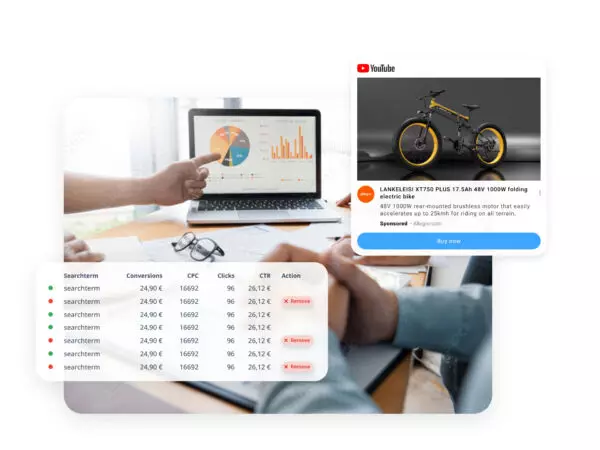
The P.Max Search Term Cleaner isn’t just another analytical tool. It’s an active helper that continuously scans the terms triggering your ads in the background.
What exactly does it do for you?
- Identifies parasites: Automatically detects loss-making queries that bring no results.
- Simplifies blocking: Turns them into negative keywords at the account or campaign level.
- Saves your budget: Instantly eliminates wasted spend.
- Boosts performance: Cleaner traffic directly translates to a better ROAS or a lower CPA.
You’re in the driver’s seat: Full control over optimization
The Cleaner is not a “black box” that wipes your account without asking. It adapts to how much control you want to hand over. You can configure campaigns independently and choose how the tool will work…
1. Who makes the decisions?
(Automation modes)
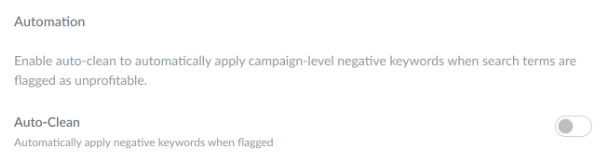
Manual approval (Review mode)
The tool acts as your advisor. It only suggests inefficient terms to you (in the To Review tab). You see the reason and decide with a single click – Add as Negative (block) or Keep Active (keep).
Full automation (Auto-Clean mode)
Do you fully trust the system? Turn on this mode, and the Cleaner will apply safe negative keywords entirely on its own.
2. How do we measure success?
(Performance models)
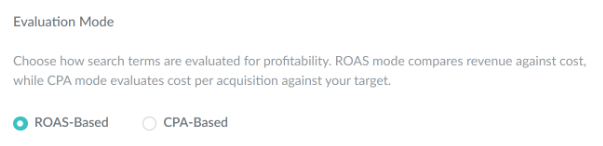
ROAS Model (Return on Ad Spend)
An e-commerce classic. If the actual ROAS of a term (revenue ÷ cost) drops below your critical threshold (for example, below 500%), the system sounds the alarm.
CPA Model (Cost per Acquisition)
A B2B and lead-gen lifesaver. If a conversion from a given query costs you more than your target limit, the term is out.
3 safety fail-safes that protect your business
To prevent the hasty blocking of promising words, the tool is equipped with advanced protection mechanisms:
- Ignoring noise (Thresholds):
The tool doesn’t evaluate terms at all until they gather relevant data. Thanks to the Min. Cost and Min. Clicks settings, it eliminates statistical anomalies.
- Brand protection (Account-level Whitelist):
There are terms (like your brand name or top products) that must always run. Add them to the Whitelist, and the system will never block them, even if their performance temporarily fluctuates. - Smart return (Needs Re-review):
The market is dynamic. If a blocked keyword starts performing well again and could meet your goals, the Cleaner re-evaluates the existing negative keyword. It marks it with a Needs re-review badge, telling you: “Hey, blocking this might currently be hurting us more than helping. Consider this.”

Ready for both Google and Microsoft
The Cleaner can handle even the most complex campaign types. It processes every single campaign independently, exactly according to its needs:
| Campaign Type | Google Ads | Microsoft (Bing) Ads | What you should know |
|---|---|---|---|
| Performance Max | ✅Supported | ✅Supported | For Microsoft Ads, the tool shows exactly which product the term matched with in the Product column. |
| AI Max | ✅Supported | ❌Unsupported | Google’s AI can easily let unprofitable queries slip in here. The Cleaner is literally a necessary fail-safe in this case (availability depends on your plan). |
Let the bad traffic go. Permanently.
Don’t fight algorithms manually and don’t let your campaigns bleed needlessly. The P.Max Search Term Cleaner will do the dirtiest data work for you, so you can focus on the overall strategy and growth of your business.
The testing of the tool is already in full swing! If you are interested in taking your campaigns to the next level, simply reach out to us. Let us know you’re interested, and we will happily activate this tool for you immediately.