
 Get Microsoft Ads setup, tools and coupon for
  free!
free! 


Focus on the Products That Actually Drive Profit
Optimize campaigns based on margin, not just sales and ROAS.
Focus on the Products
That Actually Drive Profit
Optimize campaigns based on margin,
not just sales and ROAS.
Focus on the Products That Actually Drive Profit
Optimize campaigns based on margin, not just sales and ROAS.
Identify the highest-margin products completely for FREE and invest
where it really pays off.
Not all sales are created equal… Some products generate high profits, while others just create numbers on paper. Margin Labelizer analyzes margin data from your e-shop and automatically labels products based on the real value they bring to your business.
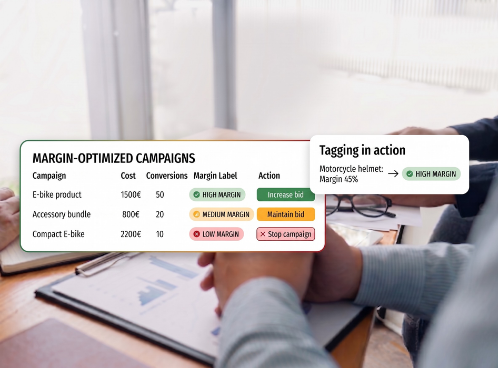
Identify the highest-margin products completely for FREE and invest where it really pays off.
Not all sales are created equal… Some products generate high profits, while others just create numbers on paper. Margin Labelizer analyzes margin data from your e-shop and automatically labels products based on the real value they bring to your business.
Identify the highest-margin products completely for FREE and invest where it really pays off.
Not all sales are created equal… Some products generate high profits, while others just create numbers on paper. Margin Labelizer analyzes margin data from your e-shop and automatically labels products based on the real value they bring to your business.
Key features of Margin Labelizer:
Key features of Margin Labelizer:
Key features of Margin Labelizer:
With Margin Labelizer, you optimize campaigns for actual profit,
knowing exactly where to invest and which products to boost.
With Margin Labelizer, you optimize campaigns for actual profit, knowing exactly where to invest
and which products to boost.
With Margin Labelizer, you optimize campaigns for actual profit, knowing exactly where to invest and which products to boost.
How does Margin Labelizer help you increase profit?
How does Margin Labelizer help you increase profit?
How does Margin
Labelizer help you
increase profit?
Label your products by margin in 6 simple steps
Label your products by margin in 6 simple steps
Label your products by margin
in 6 simple steps
Connect your product data
and set the stage for higher profit.
To get started, simply insert your product feed URL (Data source URL).
Next, utilize the XML Tag Mapping feature to quickly fill in mandatory tags, and seamlessly add your own custom tags exactly according to your needs. Everything runs smoothly and without complications.
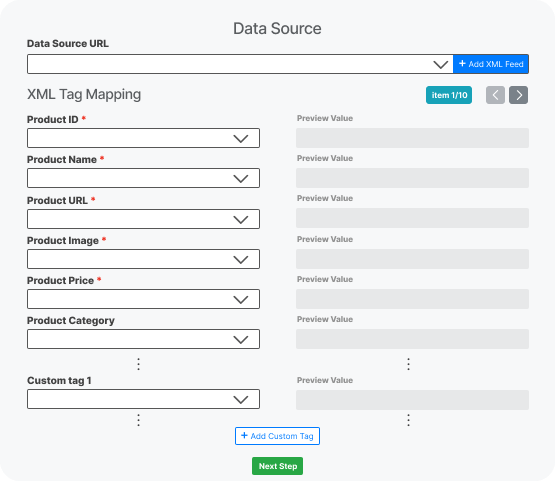
Connect your product data and set the stage for higher profit.
To get started, simply insert your product feed URL (Data source URL).
Next, utilize the XML Tag Mapping feature to quickly fill in mandatory tags, and seamlessly add your own custom tags exactly according to your needs. Everything runs smoothly and without complications.
Connect your product data
and set the stage for higher profit.
To get started, simply insert your product feed URL (Data source URL).
Next, utilize the XML Tag Mapping feature to quickly fill in mandatory tags, and seamlessly add your own custom tags exactly according to your needs. Everything runs smoothly and without complications.
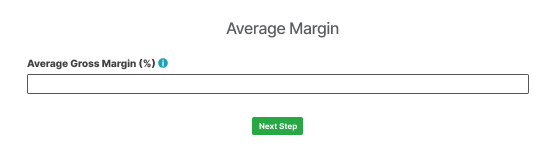
Set the average margin
for all your products.
Gain an instant baseline for optimization by defining an average margin across the board for your entire e-shop. This simple yet important step will help the system start working with realistic estimates of your profitability right from the very first second.
Set the average margin for all your products.
Gain an instant baseline for optimization by defining an average margin across the board for your entire e-shop. This simple yet important step will help the system start working with realistic estimates of your profitability right from the very first second.
Set the average margin
for all your products.
Gain an instant baseline for optimization by defining an average margin across the board for your entire e-shop. This simple yet important step will help the system start working with realistic estimates of your profitability right from the very first second.
Import specific margins
for maximum profit accuracy.
Do you have a special feed with precise margins for individual products?
Simply select it from already uploaded feeds or import it completely from scratch. This optional step is the ideal choice for advanced and absolutely precise profit optimization right at the specific product level.
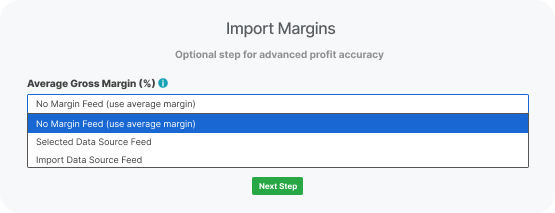
Import specific margins for maximum profit accuracy.
Do you have a special feed with precise margins for individual products?
Simply select it from already uploaded feeds or import it completely from scratch. This optional step is the ideal choice for advanced and absolutely precise profit optimization right at the specific product level.
Import specific margins
for maximum profit accuracy.
Do you have a special feed with precise margins for individual products?
Simply select it from already uploaded feeds or import it completely from scratch. This optional step is the ideal choice for advanced and absolutely precise profit optimization right at the specific product level.
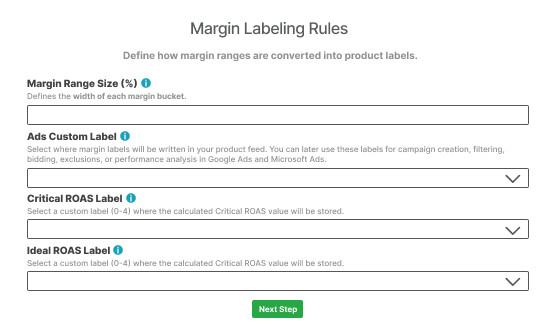
Create your own labeling rules
and customize the ranges.
Set your custom margin ranges and choose which Custom Label (0-4) in Google and Microsoft Ads the values should be written to. You can later use these labels for campaign creation, filtering, bidding, or excluding products.
Similarly, you can choose the placement for labels with Critical and Ideal ROAS values, or select the “no label” option if you prefer not to send this data just yet.
Create your own labeling rules and customize the ranges.
Set your custom margin ranges and choose which Custom Label (0-4) in Google and Microsoft Ads the values should be written to. You can later use these labels for campaign creation, filtering, bidding, or excluding products.
Similarly, you can choose the placement for labels with Critical and Ideal ROAS values, or select the “no label” option if you prefer not to send this data just yet.
Create your own labeling rules
and customize the ranges.
Set your custom margin ranges and choose which Custom Label (0-4) in Google and Microsoft Ads the values should be written to. You can later use these labels for campaign creation, filtering, bidding, or excluding products.
Similarly, you can choose the placement for labels with Critical and Ideal ROAS values, or select the “no label” option if you prefer not to send this data just yet.
Discover the true logic of ROAS
and aim for maximum profit.
For every single product, we calculate its own break-even Critical ROAS (the threshold to avoid a loss). Using the Ideal ROAS multiplier, you can then determine how much higher your ideal performance should be.
The system then clearly classifies your products into loss-making, low-profit, and those that are highly profitable and ready for scaling.
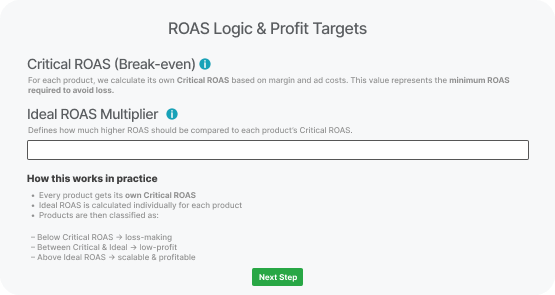
Discover the true logic of ROAS and aim for maximum profit.
For every single product, we calculate its own break-even Critical ROAS (the threshold to avoid a loss). Using the Ideal ROAS multiplier, you can then determine how much higher your ideal performance should be.
The system then clearly classifies your products into loss-making, low-profit, and those that are highly profitable and ready for scaling.
Discover the true logic of ROAS
and aim for maximum profit.
For every single product, we calculate its own break-even Critical ROAS (the threshold to avoid a loss). Using the Ideal ROAS multiplier, you can then determine how much higher your ideal performance should be.
The system then clearly classifies your products into loss-making, low-profit, and those that are highly profitable and ready for scaling.
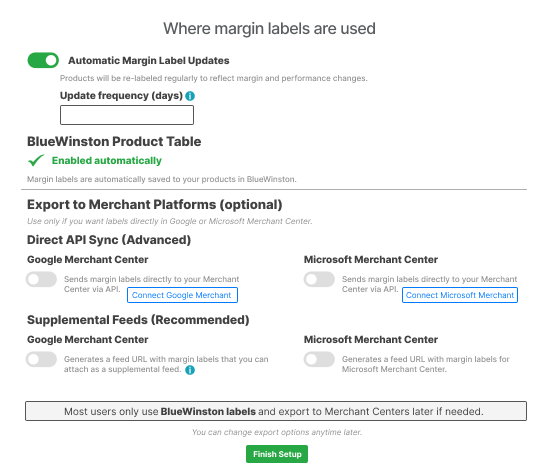
Use margin labels automatically,
wherever you need them.
Always get up-to-date data thanks to automatic updates that adjust labels to changing performance and margins.
The labels are instantly accessible in the BlueWinston product table for quick filtering and bidding optimization.
If needed, you can opt for an optional export directly to Google and Microsoft Merchant Center – via advanced API synchronization or through our recommended supplemental feeds.
Use margin labels automatically, wherever you need them.
Always get up-to-date data thanks to automatic updates that adjust labels to changing performance and margins.
The labels are instantly accessible in the BlueWinston product table for quick filtering and bidding optimization.
If needed, you can opt for an optional export directly to Google and Microsoft Merchant Center – via advanced API synchronization or through our recommended supplemental feeds.
Use margin labels automatically,
wherever you need them.
Always get up-to-date data thanks to automatic updates that adjust labels to changing performance and margins.
The labels are instantly accessible in the BlueWinston product table for quick filtering and bidding optimization.
If needed, you can opt for an optional export directly to Google and Microsoft Merchant Center – via advanced API synchronization or through our recommended supplemental feeds.
Leverage a detailed overview of your margins and gain absolute control
over the profitability of every single campaign.
Leverage a detailed overview of your margins and gain absolute control over the profitability
of every single campaign.
Leverage a detailed overview of your margins and gain absolute control over the profitability of every single campaign.
Have all key profit data in one place.

Have all key profit data in one place.
Have all key profit data in one place.
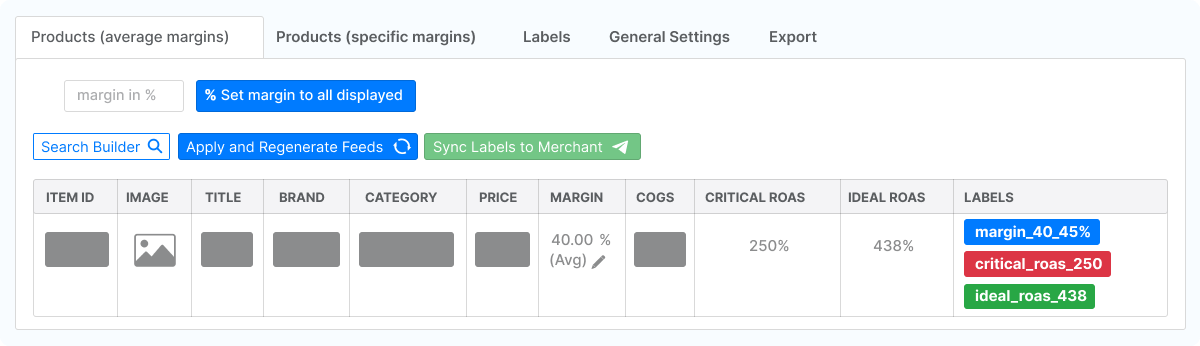
For each product, you will find its:
selling price
actual costs (COGS)
current margin
Additionally, the system automatically calculates:
the ROAS you need to avoid a loss (Critical ROAS)
your ideal target ROAS (Ideal ROAS)
which label the product received based on its profitability
For each product, you will find its:
- selling price
- actual costs (COGS)
- current margin
Additionally, the system automatically calculates:
- the ROAS you need to avoid a loss (Critical ROAS)
- your ideal target ROAS (Ideal ROAS)
- which label the product received based on its profitability
For each product, you will find its:
- selling price
- actual costs (COGS)
- current margin
Additionally, the system automatically calculates:
- the ROAS you need to avoid a loss (Critical ROAS)
- your ideal target ROAS (Ideal ROAS)
- which label the product received based on its profitability
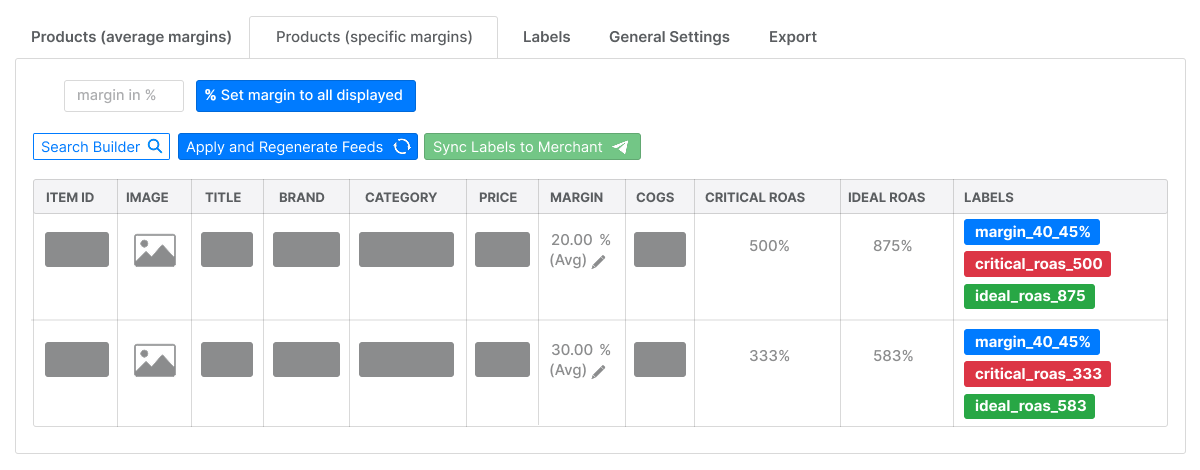
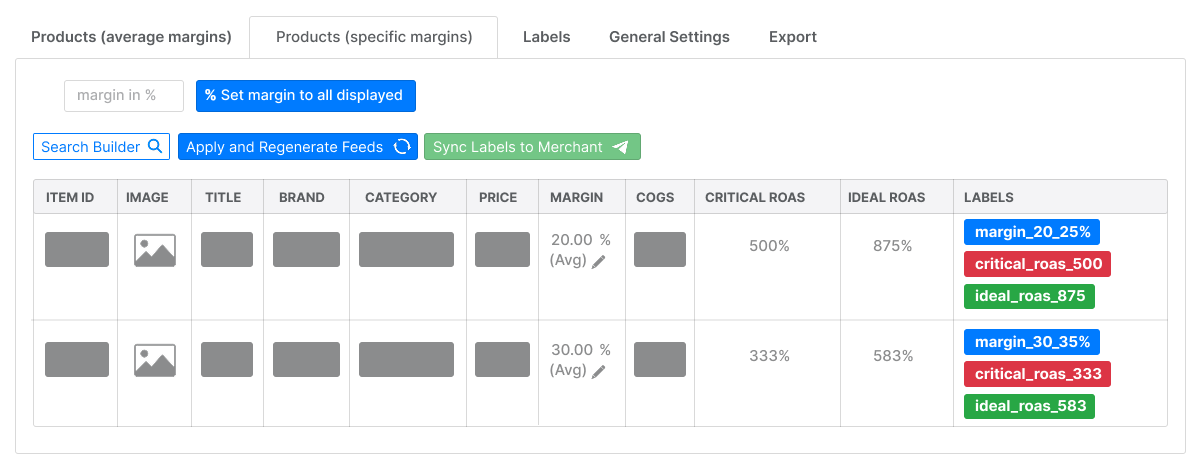
Adjust margins easily as prices change.
Specific product adjustments.
Manually edit a product’s margin anytime. The system instantly recalculates all targets.
Bulk changes.
Filter a group of products (for example, a single brand) and set a new margin for all of them at once with a single click.
Two levels of precision.
You can work with a flat average margin for the entire e-shop, or set exact numbers only for selected products.
Adjust margins easily as prices change.
Specific product adjustments.
Manually edit a product’s margin anytime. The system instantly recalculates all targets.
Bulk changes.
Filter a group of products (for example, a single brand) and set a new margin for all of them at once with a single click.
Two levels of precision.
You can work with a flat average margin for the entire e-shop, or set exact numbers only for selected products.
Adjust margins easily as prices change.
Specific product adjustments.
Manually edit a product’s margin anytime. The system instantly recalculates all targets.
Bulk changes.
Filter a group of products (for example, a single brand) and set a new margin for all of them at once with a single click.
Two levels of precision.
You can work with a flat average margin for the entire e-shop, or set exact numbers only for selected products.
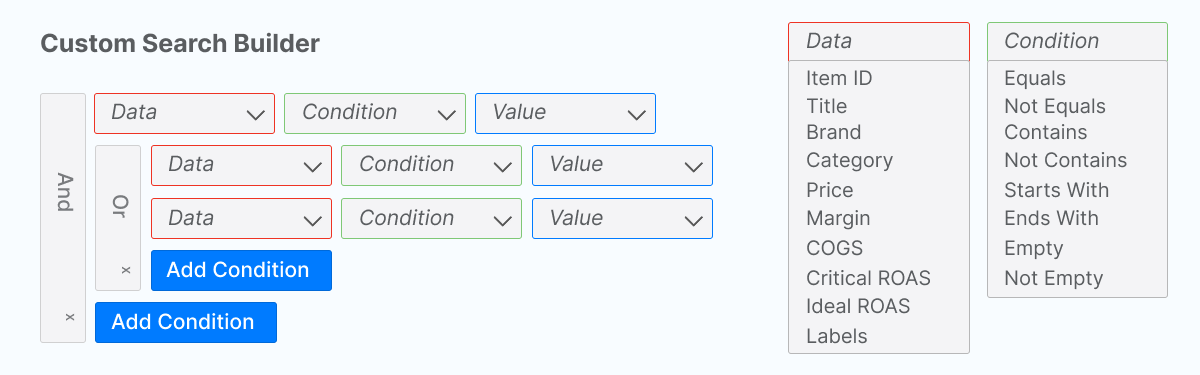
Filter your products exactly how you need.
Using the advanced search (Custom Search Builder), you can display products exactly according to your rules.
You can filter by costs, specific labels, ROAS values and more (by combining “AND” / “OR” conditions).
Filter your products exactly how you need.
Using the advanced search (Custom Search Builder), you can display products exactly according to your rules.
You can filter by costs, specific labels, ROAS values and more (by combining “AND” / “OR” conditions).
Filter your products exactly how you need.
Using the advanced search (Custom Search Builder), you can display products exactly according to your rules.
You can filter by costs, specific labels, ROAS values and more (by combining “AND” / “OR” conditions).
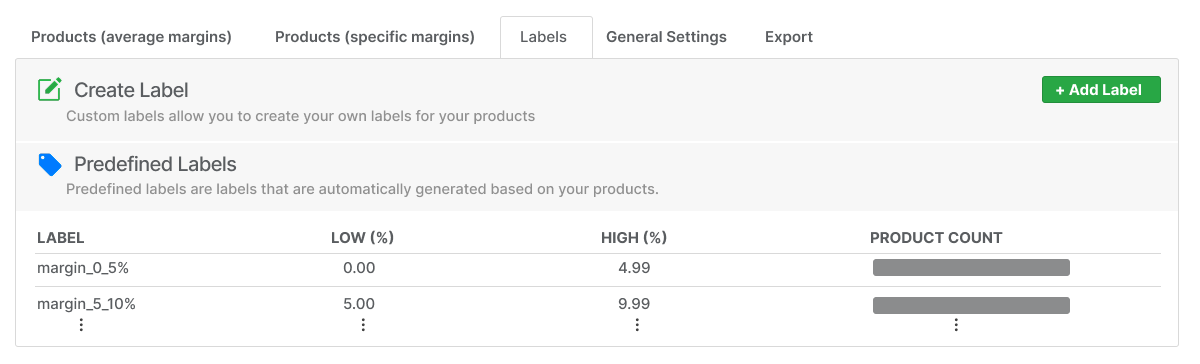
Find out how your e-shop is performing and create your own labels.
In the system, you can immediately see which margin groups your products fall into
and exactly how many items you actually have in each group.
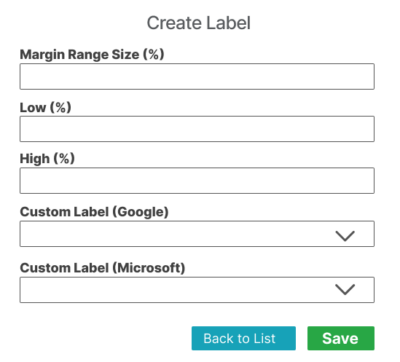
Labels tailored to your needs.
Do the standard ranges not suit you?
Create your own(Custom labels). Set specific percentage thresholds exactly according to your strategy and assign them to specific slots for Google or Microsoft Ads.
Find out how your e-shop is performing and create your own labels.
In the system, you can immediately see which margin groups your products fall into and exactly how many items you actually have in each group.
Labels tailored to your needs.
Do the standard ranges not suit you?
Create your own(Custom labels). Set specific percentage thresholds exactly according to your strategy and assign them to specific slots for Google or Microsoft Ads.
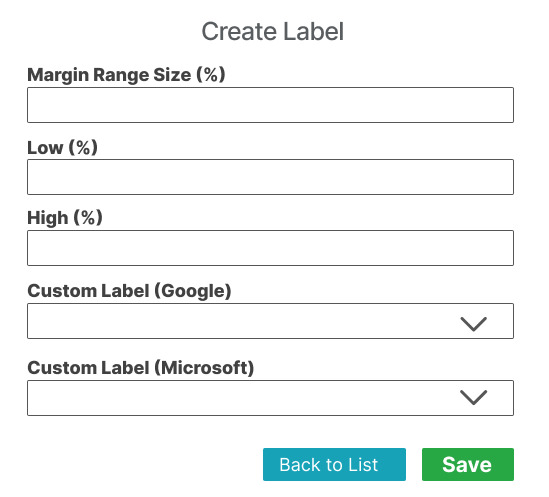
Find out how your e-shop is performing and create your own labels.
In the system, you can immediately see which margin groups your products fall into and exactly how many items you actually have in each group.
Labels tailored to your needs.
Do the standard ranges not suit you?
Create your own(Custom labels). Set specific percentage thresholds exactly according to your strategy and assign them to specific slots for Google or Microsoft Ads.
Get your margin data into your campaigns.
From the labeled products, the system can generate a single URL that you simply insert
into Google or Microsoft Merchant Center as a supplemental feed.
Get your margin data into your campaigns.
From the labeled products, the system can generate a single URL that you simply insert
into Google or Microsoft Merchant Center as a supplemental feed.
Get your margin data into your campaigns.
From the labeled products, the system can generate a single URL that you simply insert
into Google or Microsoft Merchant Center as a supplemental feed.
Your campaigns will instantly start working with the new data, so advertising
algorithms can finally start optimizing your bids for actual profit.
Your campaigns will instantly start working with the new data, so advertising algorithms can finally start optimizing your bids for actual profit.
Your campaigns will instantly start working with the new data, so advertising algorithms can finally start optimizing your bids for actual profit.
Improve your campaigns
start gaining new conversions.
*Book a call and let’s start optimizing!
Improve your campaigns start gaining new conversions.
*Book a call and let’s start optimizing!
Improve your campaigns
start gaining new conversions.
*Book a call and let’s start optimizing!
Book a quick 20 minute call
